Settings & Functions
Via the Three-Dot Menu (bottom right on the home screen), you access global app settings and special functions.
The scope of functions in this menu varies depending on the edition and your role in the company.
- Professional
- Team (Driver)
- Team (Admin)
View for Drivers (Professional Edition)
In the Professional Edition, the focus is on operational navigation. Data management takes place centrally in the Web Cockpit, so options here are limited to local app settings.
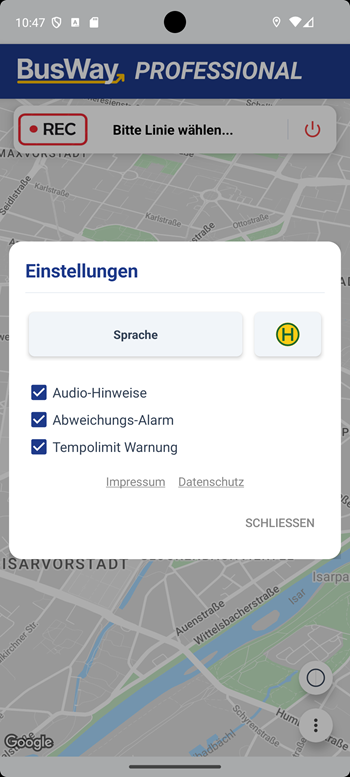
View for Drivers (Team Edition)
Since the Team Edition is organized decentrally, basic management functions are available to drivers here.
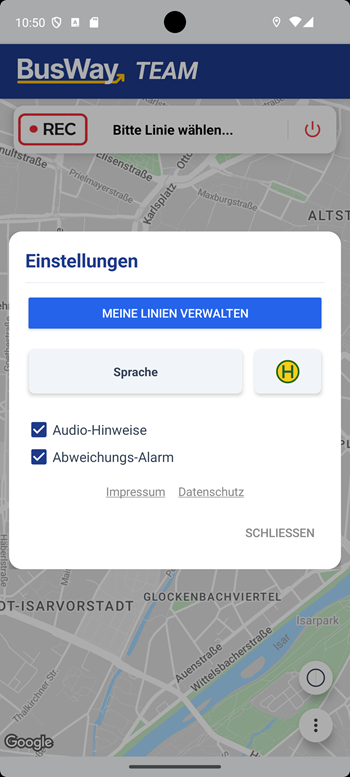
Additional Functions
- Manage My Lines: Opens the local editor on the device. Here, names of lines and stops that you have recorded yourself can be corrected later.
View for Admins (Team Edition)
As an administrator in the Team App, you have access to powerful import interfaces.
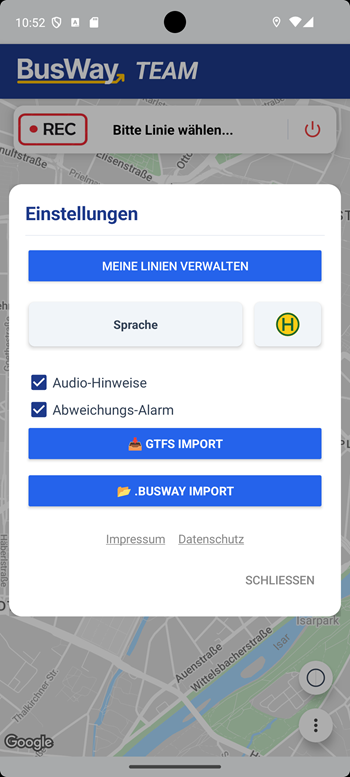
Import Tools
- GTFS Import: 🔥 Enables the import of official schedule data (GTFS format). This automatically generates lines and stops from public sources.
- .BUSWAY Import: 📁 Imports data backups or route packages created with the BusWay Free App.
General Settings
The following options are available in all editions:
Visual Appearance (Icons)
Next to the language selection, there is a button with a Stop Symbol (H). Pressing this button opens the design selection:
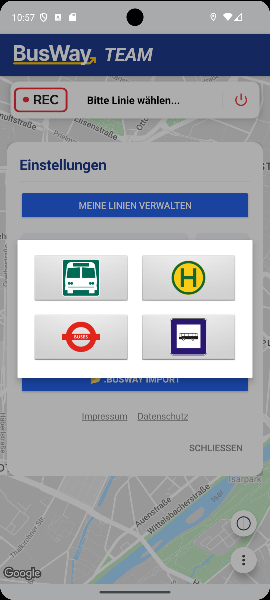
Here you can define how stops should be visualized on the map (e.g., yellow "H", Bus symbol, or London style). This setting is local and affects only your device.
Audio & Alerts
- Language: Changes the display and announcement language of the app in real-time.
- Audio Cues: Controls the voice announcement ("Next stop..."). Disable this if you do not wish for acoustic support.
- Deviation Alarm: Warns as soon as the vehicle leaves the defined route path.
- Speed Limit Warning: Visually signals when the maximum permitted speed is exceeded (provided it is stored in the route data).
Legal
Via the links at the bottom edge ("Imprint", "Privacy"), you reach the legally required mandatory information.